Printing on the move
Portable printers
Small, battery-friendly printers for travel, field work and printing from a phone.
- Upfront cost: Medium
- Running cost: High
- Speed: Low
- Color: Some models
Independent guide — not affiliated with any manufacturer. For warranty or official support, contact the maker of your printer.
Overview
Portable printers shrink the printer down to something that fits in a bag. Some are slim inkjets that print full-size pages from a battery; others are pocket photo printers or thermal printers that print receipts and notes.
They trade speed, capacity and per-page cost for convenience. If you need a printed page where there is no office, nothing else comes close.
How it works
-
Connect wirelessly
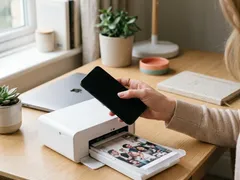
Most portable printers pair directly with a phone, tablet or laptop over a wireless connection, with no network needed.
-
Run on a battery
A rechargeable battery powers the printer for a limited number of pages per charge.
-
Print with a small engine
Depending on the model, a compact inkjet head, a thermal head or a dye-sublimation unit puts the image on paper.
-
Feed one sheet at a time
There is usually no large tray, so you load a few sheets or a small cartridge of photo paper.
Pros and cons
| Pros | Cons |
|---|---|
| Fits in a bag or glovebox | Slow and small paper capacity |
| Prints without an office or network | Higher cost per page |
| Pairs directly with phones | Battery limits how much you can print |
| Some models print with no ink at all | Fewer paper sizes and types |
Best for
-
Field work
Inspection reports, invoices and receipts on site.
-
Travel and events
Boarding documents, tickets, instant photos.
-
Small spaces
Dorm rooms or desks where a full printer will not fit.
What it costs to run
Expect a higher cost per page than a full-size printer. Small ink cartridges and specialty media are the main reasons.
Thermal portable printers have no ink cost, but need their matching paper.
Pocket photo printers sell paper in packs; divide the pack price by the number of prints to compare models.
Prices and page yields vary by model and change over time, so we do not quote figures here. Our guide to calculating cost per page shows how to compare any two printers yourself.
Guides for portable printers

Official manufacturer resources
For your exact model, the manual and the maker's website are the authoritative source.
- HP — manuals, drivers and product help (hp.com) (opens in a new tab)
- Canon — manuals, drivers and product help (usa.canon.com) (opens in a new tab)
- Epson — manuals, drivers and product help (epson.com) (opens in a new tab)
- Brother — manuals, drivers and product help (brother.com) (opens in a new tab)
- Xerox — manuals, drivers and product help (xerox.com) (opens in a new tab)
- Lexmark — manuals, drivers and product help (lexmark.com) (opens in a new tab)
- Kyocera — manuals, drivers and product help (kyoceradocumentsolutions.us) (opens in a new tab)
- Ricoh — manuals, drivers and product help (ricoh-usa.com) (opens in a new tab)
Keep reading
Not sure this is the right type for you?
Compare all eight side by side, or read our neutral buying guides before you decide.